
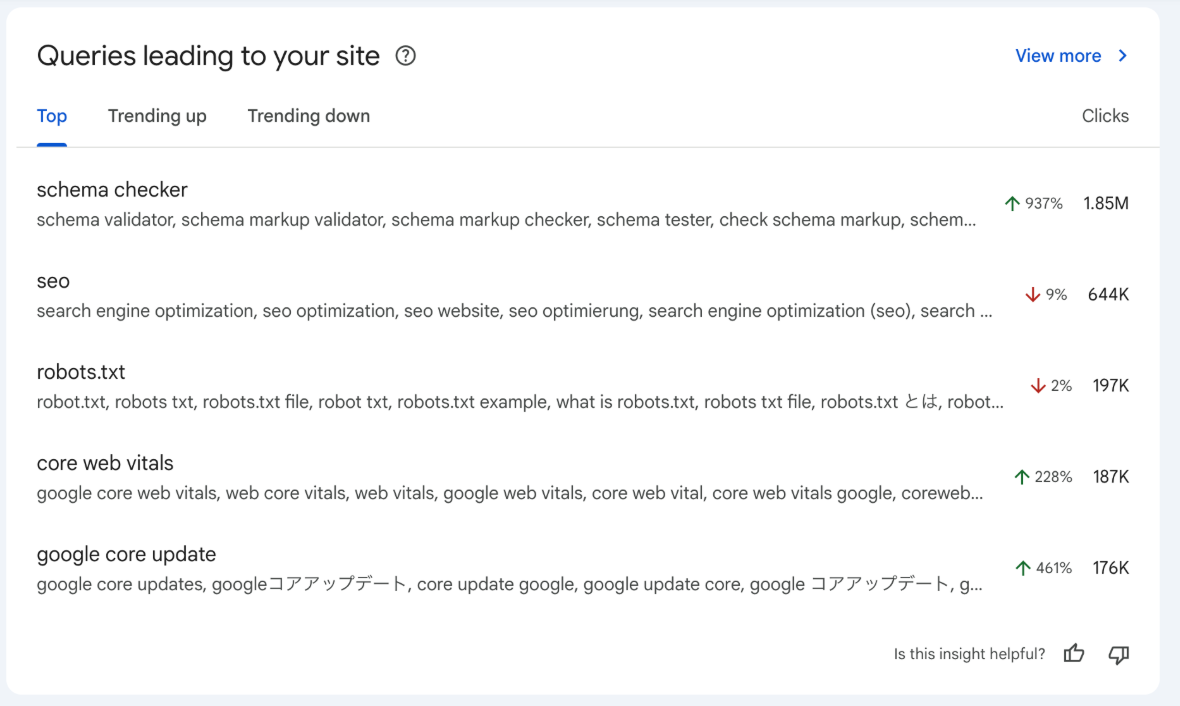

Query groups are arriving in Search Console Insights: a new card that uses artificial intelligence to cluster equivalent searches and summarize them by topic. The launch was announced on October 27, 2025 and is currently rolling out gradually, especially for properties with high query volumes.
What changes vs. the classic Queries report
Until now, analysis started from the individual query: there were a hundred ways to ask for the same thing, and you had to add up, filter, and export to reach conclusions. In practice, SEO teams ended up building topic clusters by hand:
export all queries to a sheet,
- normalize capitalization, accents, and typos,
- remove noise (brand, navigational, other languages),
- group by intent and synonyms with rules/regex,
- create pivot tables or scripts (BigQuery/Python) to consolidate,
- assign each cluster to a lead page and document cannibalization.
On medium or large sites, this process took several hours per content line every month, with the risk of bias (each analyst groups differently) and drift (clusters go out of date). The new feature automates much of the discovery and aggregation, and leaves business decisions in our hands: choosing the lead page, tuning the messaging, and measuring impact.
With query groups, the starting point is the topic. Each group gathers variations that share intent (synonyms, common typos, equivalent phrases, or even across languages) and shows aggregated clicks, impressions, and CTR. If you need detail, you can open the Performance report and inspect individual queries.
Important: this is an analytical view that does not change rankings. Groups are generated by AI models and may evolve over time.
Where to see it and how the card works
- Location: Search Console → Insights (Search Console Insights).
- Card views: Top, Trending up, and Trending down.
- Within each group you’ll find:
Group name (based on the query with the most clicks in the set). - Aggregated performance for the topic (sum of clicks, impressions, and CTR).
- Representative queries and a link to drill down in the Performance report.
Examples of groupings (by vertical)
The logic is simple: same intent → same topic.
- Recipes (informational). The topic “how to make guacamole” groups searches like “guacamole recipe,” “easy guacamole,” “homemade guacamole sauce,” “step-by-step guacamole.” The lead page is a clear guide with variants and an FAQ section.
- Ecommerce (footwear). The topic “waterproof trail shoes” gathers “trail gore-tex,” “shoes for rain,” “waterproof membrane.”
- B2B SaaS. The topic “invoicing software for freelancers” groups “freelancer invoice program,” “freelance invoicing app,” “online invoicing.”
- Local services. The topic “solar panel installation Madrid” groups “solar panels Madrid,” “photovoltaic quote,” “installers in Madrid.”
- Domestic travel. The topic “cheap Madrid–Barcelona train” gathers “cheap tickets,” “AVE offers,” “fast train price.”
What it’s useful for in digital marketing
- Spot topics that concentrate demand. Picking 2–3 topics in Top or Trending up is enough to set a short-term focus.
- Prioritize content by topic. Plan quarterly based on size, trend, and effort. For example, large and rising topics with light changes go first.
- See a topic’s trend. If it’s up, reinforce it now; if it’s down, it can wait for the next cycle.
- Align messaging. Incorporate expressions from the group (the language users actually use) into titles, headings, and creatives.
- Unify measurement. Tag campaigns, content, and CRM with the same topic to follow the entire funnel.
Worked example: “waterproof trail shoes”
Signal: the topic appears in Trending up and impressions/clicks are growing.
What we do (SEO only):
Architecture
- Create an indexable subcategory: /zapatillas/trail-impermeables/
- Add it to navigation and breadcrumbs: Shoes → Waterproof trail.
On-page
Optimize title & meta with the group’s extracted keywords: “Waterproof trail running shoes | Gore-Tex and wet grip.”
- Optimize the H1.
- Create useful content on the PLP using the strategic keywords pulled from the group.
- Extract FAQs from the group (“Are they suitable for fast runs?”, “Gore-Tex vs. proprietary membrane—what’s the difference?”, “How do you care for them after rain?”) and include this information on the category text and even on product pages (PDP) where relevant.
- Add structured data: ItemList for listings and Product/AggregateOffer on PDPs if applicable.
Internal linking
- Links from Trail Shoes and related posts with natural anchors (“waterproof trail shoes”).
- Related-items blocks on PDPs/guides pointing to the subcategory.
Supporting conten
- Membrane comparison (clear table).
- “How to choose waterproof trail shoes” (common mistakes + checklist).
- Care guide.
Link all of these back to /zapatillas/trail-impermeables/.
Pros and limitations
Pros
- Topic view: understand demand without reviewing variations one by one or exporting sheets.
- Clear trends: Top / Trending up / Trending down views help decide when to act.
- One click from topic to detail: open the Performance report to see queries and involved URLs.
- Fast overlap detection: when several pages appear within the same topic, cannibalization is easier to spot.
Limitations
- Gradual rollout: it may not be active yet for some properties.
- Needs volume: groups are more useful when there are enough queries around the same subject.
- AI-driven dynamics: the composition and names of groups can change over time; compare period over period.
FAQs
Do we lose keyword granularity?
No. The detail remains in the Performance report. Groups help you prioritize; queries help you execute.
What if the grouping includes queries that don’t fit?
It can happen. A quick review of a sample of queries usually suffices to choose the lead page by intent. If a relevant query sits outside, treat it as a subtopic/FAQ or as supporting content.
Can you compare historicals if groups change?
Yes—but manually for now, saving historicals in a separate document.
Does it mix brand and non-brand?
Sometimes. For clearer reporting, you can separate branded vs. non-branded keywords within the topic using filters/searches. That way you distinguish demand capture (brand) from growth (non-brand).
Does it group different languages or countries?
Languages: it may group variations across languages.
Countries: documentation doesn’t specify; to compare markets, open the group in the Performance report and filter by country before drawing conclusions.
Can the group label sound odd?
That’s common: the label uses the query with the most clicks. What matters is the topic content and the queries that form it.
Is the long tail being “buried”?
No. The long tail is summed within the group (useful for prioritization) and remains available in detail to create FAQs or micro-blocks when very specific questions appear.
What about cannibalization?
More visible: multiple URLs can appear within the same topic. Practical rule: 1 intent = 1 lead page; the rest act as support, with clear linking to the lead.
And SERP features (video, images, maps)?
They can affect a topic’s CTR. If CTR looks off, review the main queries and how you appear in search; in some cases, reinforcing the lead page with FAQ/HowTo/video helps.
Is there an API/download for the dashboard?
For now the view is in Insights. Practically, you can build a topic-based dashboard and save a monthly export with aggregated metrics and representative queries.
Why Query Groups Transform Your Decision-Making
Query groups change the starting point—from reading isolated keywords to understanding topics. With an aggregated view and trend signals you can decide faster what to reinforce, avoid cannibalization, and measure business impact by topic.