

The end of independent Display campaigns in Google Ads: Timeline, impact, and a step-by-step migration guide

If you manage Paid Media accounts, you have likely already seen the blue notice at the top of your campaigns tab in Google Ads: “Upgrade Display campaigns to Demand Gen”.
This is not a beta test or just another optimization recommendation. Google has officially begun the gradual absorption of the Display Network inventory into Demand Gen campaigns. The Google Display Network (GDN) is not going away as an ad inventory—we will still be able to reach users across more than two million websites and apps—but how you buy and manage this ad space is changing forever.
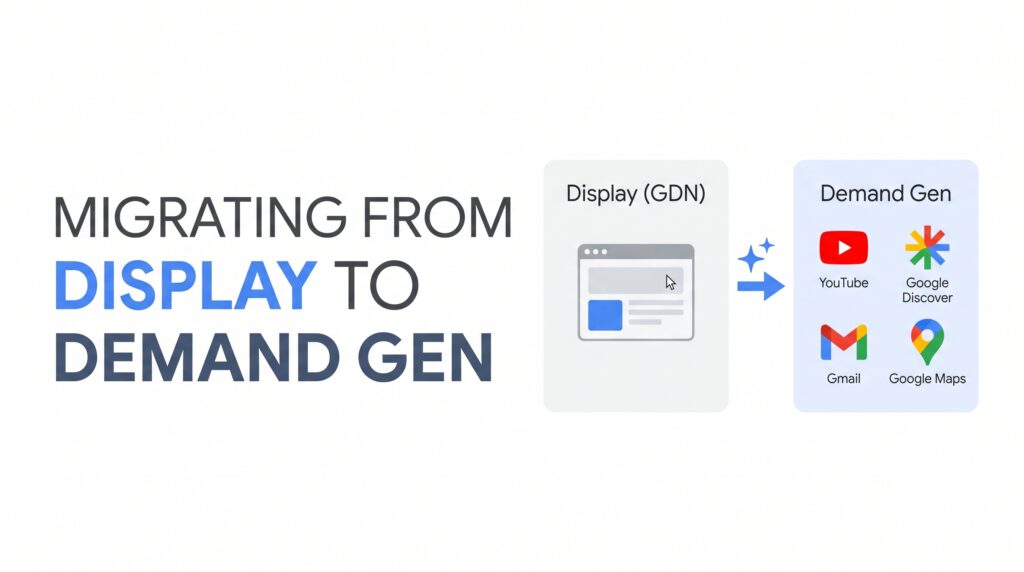
Below, I will dive into the official timeline, what actually happens behind the scenes when you click upgrade, and how we are managing this transition at Relevant Group to prevent CPA spikes and conversion drops.
Official timeline: When is the transition happening?
The rollout is not immediate for 100% of accounts, but rather phased:
- June 2026 (Current phase): Google has been gradually enabling the internal upgrade tool in the Google Ads dashboard. If your campaigns meet the requirements, you will see the notification and can execute the voluntary transition while preserving your campaign history.
- Second half of 2026: Block on new creations. Traditional Display campaigns can no longer be created as an independent campaign type and must be set up within the Demand Gen framework.
- Automatic migration phase (Late 2026 / 2027): Any active Display campaigns that have not been manually converted by advertisers will be automatically upgraded by Google’s systems.
Consultant’s tip: As is often the case with Google’s automatic transitions (remember the Performance Max rollout), waiting for the automatic migration is the worst approach. Google’s AI will handle the technical conversion, but it will not optimize your creative assets or control first-day spending spikes.
What happens in your account during migration (and the fine print)
When you select a Display campaign and click Edit > Upgrade to Demand Gen, the platform executes several background adjustments that you need to know in detail:
1. The main benefit: Retaining 42 days of historical data
If you use the built-in upgrade tool, the new campaign inherits the previous 42 days of the algorithm’s learning history. This is crucial: it reduces the learning phase to just 1 or 2 days instead of taking weeks to gather data from scratch. The alternative (lowering budget in Display and manually creating a new Demand Gen campaign) creates a cold start that typically causes initial CPAs to surge.
2. The risk of the daily budget reset
Pay close attention to this, as it directly impacts your account’s pacing: the newly upgraded campaign does not recognize the budget spent on the actual day of the migration.
Real-world example: If your Display campaign has a €50 daily budget and you upgrade it at 3:00 PM after it has already spent €15, the new Demand Gen campaign will launch at that hour with the full €50 available to spend for the remainder of the day. To avoid over-delivery or daily budget discrepancies, always execute migrations late in the day or early in the morning.
3. Campaign naming and visibility
Upgraded campaigns automatically adopt the naming convention [Original Campaign Name] #2 and are classified as Demand Gen. In your bulk actions history and the main campaigns table, they will be labeled as "Pasted as Demand Gen" or "Pasted as Demand Gen on [date]".
Location of the upgrade option in the platform:

[ Campaigns Menu ] ──> [ Filter by: Campaign type = Display ]
                                │
                                ▼
         [ Select campaigns and open the "Edit" menu ]
                                │
                                ▼
                  [ Upgrade to Demand Gen ]
Technical nuances and what you gain (and lose)
Upgrading to Demand Gen does not just change the campaign type; it fundamentally changes how the algorithms cross-reference channels.
| Feature | Traditional Display Campaign | GDN in Demand Gen |
| Accessible inventory | GDN, YouTube, and Gmail. | GDN, YouTube (Feed, In-Stream, Shorts), Discover, Gmail, and Maps (in beta). |
| Audiences & data | Remarketing lists, intent, and contextual targeting. | All of the above + Lookalike Segments. |
| Creative formats | Responsive Display Ads, static images, and HTML5. | Responsive Display Ads, carousels, short & long-form videos, and AI-generated images. |
| Bidding models | Maximize Conversions, tCPA, tROAS, manual CPC, Pay-per-conversion. | Maximize Conversions, tCPA, tROAS, Maximize Clicks, target CPC, and variable campaign total budgets. |
- What you gain: The introduction of Lookalike Segments powered by your first-party data (such as customer lists). This is by far the best tool to scale qualified prospecting within the visual inventory.
- What you need to monitor: The GDN is enabled by default in the migrated campaign and cannot be disabled during the upgrade. Only after the upgrade is complete can you adjust channel distribution and add YouTube, Discover, or Gmail placements.
- Heads up on measurement studies: If you have an active Conversion Lift study, do not use the upgrade tool until it finishes. The newly converted campaign will be automatically disconnected from the study.
How to manage the transition as a Senior Consultant: Step-by-step strategy
Do not just click the upgrade button and walk away. If you want this change to go unnoticed in your clients’ performance reports, this is the workflow we should apply:
Before upgrading: Asset preparation
Demand Gen rewards a variety of visual formats. If you migrate a campaign that only contains static horizontal banners, you will limit the algorithm and miss out on key placements like Shorts or Discover.
- Prepare multi-device creative assets: Design image variants in 1.91:1 (horizontal), 1:1 (square), and 4:5 or 9:16 (vertical).
- Add video formats: Include at least one high-resolution video asset (10-30 seconds). It doesn’t need to be a major production, but it must be a dynamic asset adapted for vertical consumption.
- Review remarketing lists and logos: The platform will automatically populate company names and logos from the old campaign. If the Display campaign did not have them, a generic image will be created. Reviewing them beforehand prevents your ads from displaying with a neutral placeholder.
During migration: Controlled execution
- Filter your Display campaigns and select a batch of no more than 100 campaigns at a time to prevent API errors in the platform.
- Launch the upgrade early in the morning or after the close of the business day to mitigate any budget pacing issues on day one.
- Verify the status of the migration in Tools > All bulk actions to confirm that the status is completed.
After migration: Stabilization phase
- Be patient with fluctuations: During the first 3 to 5 days, it is entirely normal to see fluctuations in eCPM or delivery. Do not alter the tCPA or tROAS during the first week. Modifying bids during the initial calibration often forces the algorithm to restart its learning.
- Audit format performance: Take advantage of the new format segmentation reports to evaluate how your inventory is performing across In-feed, skippable In-stream, and Shorts.
- Scale with Lookalikes: Once the campaign has stabilized (usually from day 10-14), create an ad group targeting a 2.5% to 5% Lookalike Segment based on your highest-value customer list.
Conclusion
Unifying Display within Demand Gen confirms the trajectory of media buying on Google: fewer fragmented networks and more automated, multi-channel strategies supported by strong creatives and first-party data.
Aproaching this transition proactively using the upgrade tool ensures you retain up to 42 days of conversion signals, protecting your accounts’ profitability.
At Relevant Group, we help brands and marketing teams audit their Paid Media structures, optimize their audience ecosystems, and execute complex technical migrations without risking business acquisition. If you need consulting to plan your campaign transition, contact our team today.

10 articles published on the Relevant Group blog.